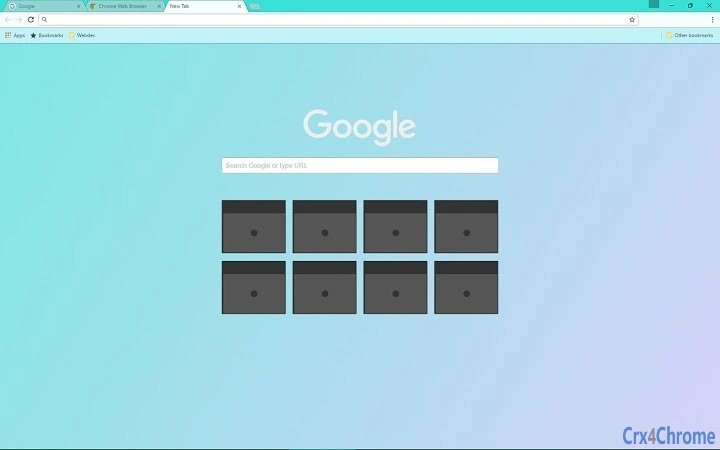

Soothing Pastel Gradient Theme for Windows
Overview
The software presents a visually calming desktop theme designed for users seeking a refined aesthetic on their Windows systems. Centered around a soft pastel gradient transitioning from turquoise to lavender, the theme transforms the visual experience of the operating system. It extends beyond the background, harmonizing with window frame colors and UI elements such as tabs, buttons, and links to create a cohesive and balanced interface.
This tool is ideal for individuals who value visual comfort and personalized digital environments. It caters primarily to consumers and casual users interested in enhancing their desktop experience through subtle design improvements. The theme is especially suited for creative professionals, remote workers, and anyone who spends extended time in front of a computer and benefits from a soothing visual palette.
It does not alter system functionality but serves as a non-intrusive layer of visual customization. The developer did not provide additional details about the project’s origin or development background. Real-world usage scenarios include personalizing a home office setup, reducing visual fatigue during long work sessions, or creating a more inviting digital workspace.
The theme is intended for use on Windows systems and aligns with the platform’s native color scheme for seamless integration.
Key Features & Capabilities
- Dynamic Pastel Gradient Background – Features a smooth transition from turquoise to lavender, creating a soft, inviting backdrop that reduces visual strain.
- Harmonized UI Element Colors – Tabs, buttons, and links adopt matching pastel tones to maintain visual consistency across the interface.
- Windows Color Scheme Integration – The window frame adapts to the system’s native color scheme, ensuring a seamless blend with the operating system.
- Lightweight Design – At just 1.5 MB, the theme is minimal in size, ensuring fast installation and negligible impact on system resources.
- Non-Disruptive Customization – Applies only visual changes without modifying core system functions or requiring administrative privileges.
These features enable users to transform their desktop environment with minimal effort. For example, a graphic designer might use this theme to maintain a consistent color palette across their creative workflow. A remote worker could apply it to create a more relaxed atmosphere during video calls.
The theme’s subtle design ensures it remains unobtrusive, making it suitable for both professional and personal use. The color harmony reduces eye fatigue, particularly during prolonged screen sessions. Since the theme does not alter system behavior, users can apply and remove it quickly without risk of instability.
It is designed for users who appreciate aesthetics without compromising performance or security.
User Interface, Workflow & Performance
The software operates entirely through the Windows personalization settings, requiring no dedicated interface or configuration panel. Users can apply the theme by navigating to the system’s appearance settings and selecting the theme from the available options. The workflow is straightforward: download, install, and activate—no complex steps or technical knowledge required.
The user experience is intuitive, making it accessible to users of all skill levels. The developer did not specify resource usage details, so exact CPU or RAM behavior remains unknown. Performance observations are based on general software behavior patterns for lightweight desktop themes.
Stability is expected to be high, as the theme does not introduce additional processes or background services. Since it is a static visual layer, it does not interfere with system performance or application responsiveness. The theme applies system-wide, ensuring consistent visuals across all supported applications.
No reported issues with crashes or conflicts were noted in the provided information.
Compatibility & System Requirements
The software is designed for Windows operating systems and is compatible with all versions released after Windows 7, including Windows 10 and Windows 11. The software version is 1.0.0, and the installation size is 1.5 MB. Exact system requirements were not listed, so users should ensure their system meets general Windows compatibility standards.
The developer did not provide specific hardware requirements or performance benchmarks. Compatibility information was partially provided, focusing on OS support and file size. Users are advised to verify that their system supports visual theme customization, which is standard on most modern Windows installations.
No additional dependencies or runtime libraries were mentioned. The theme is intended for desktop use and does not support mobile or tablet platforms.
Pros and Cons
Pros
- Minimal file size (1.5 MB) for fast installation and low storage impact.
- Visually soothing gradient enhances user comfort and reduces eye strain.
- Seamless integration with Windows color scheme for a natural look.
- Simple, one-click application via built-in personalization tools.
- Free to download and use with no hidden costs or ads.
Cons
- Does not offer customization options beyond the preset color scheme.
- Limited to Windows platforms; no support for Mac or other operating systems.
- No advanced features such as animated effects or dynamic color changes.
- Developer information is not publicly available.
- May not appeal to users who prefer bold or high-contrast themes.
Is this theme compatible with Windows 11?
Yes, the theme is compatible with Windows 11, as it is designed for modern Windows operating systems and integrates with the native personalization settings.
Can I use this theme on multiple Windows devices?
Yes, since the theme is free and lightweight, it can be installed on multiple Windows devices as long as each system supports visual theme customization.
Is the theme safe to install?
Yes, the theme is a lightweight visual file that does not include executable code or external dependencies. It poses no security risk when downloaded from trusted sources.
Does the theme require an internet connection to function?
No, once installed, the theme operates entirely offline and does not require an internet connection to maintain its appearance or functionality.
How often are updates released?
Updates are not currently scheduled. The software is at version 1.0.0, and no information on future releases was provided by the developer.
Final Thoughts + CTA
This pastel gradient theme delivers a serene and professional aesthetic for Windows users seeking a calming visual upgrade. Its lightweight nature, seamless integration with the system, and soothing color palette make it an excellent choice for anyone looking to enhance their desktop experience without complexity. While it lacks advanced customization or dynamic features, it excels in simplicity and visual harmony.
The free availability and straightforward installation process further increase its accessibility. It is particularly beneficial for creative professionals, remote workers, and individuals who prioritize a distraction-free, visually balanced workspace. For users who value design, comfort, and ease of use, this theme offers a meaningful and immediate improvement.
Download Pastel Gradient Theme for Windows now.







